Why reviews outconvert everything else on your page
When I audit a store that gets traffic but no sales, the first thing I check is not the price or the photos. It is the reviews. A product page without social proof is asking a stranger to trust you with their credit card based on your word alone. Nobody does that anymore, and honestly, nobody should.
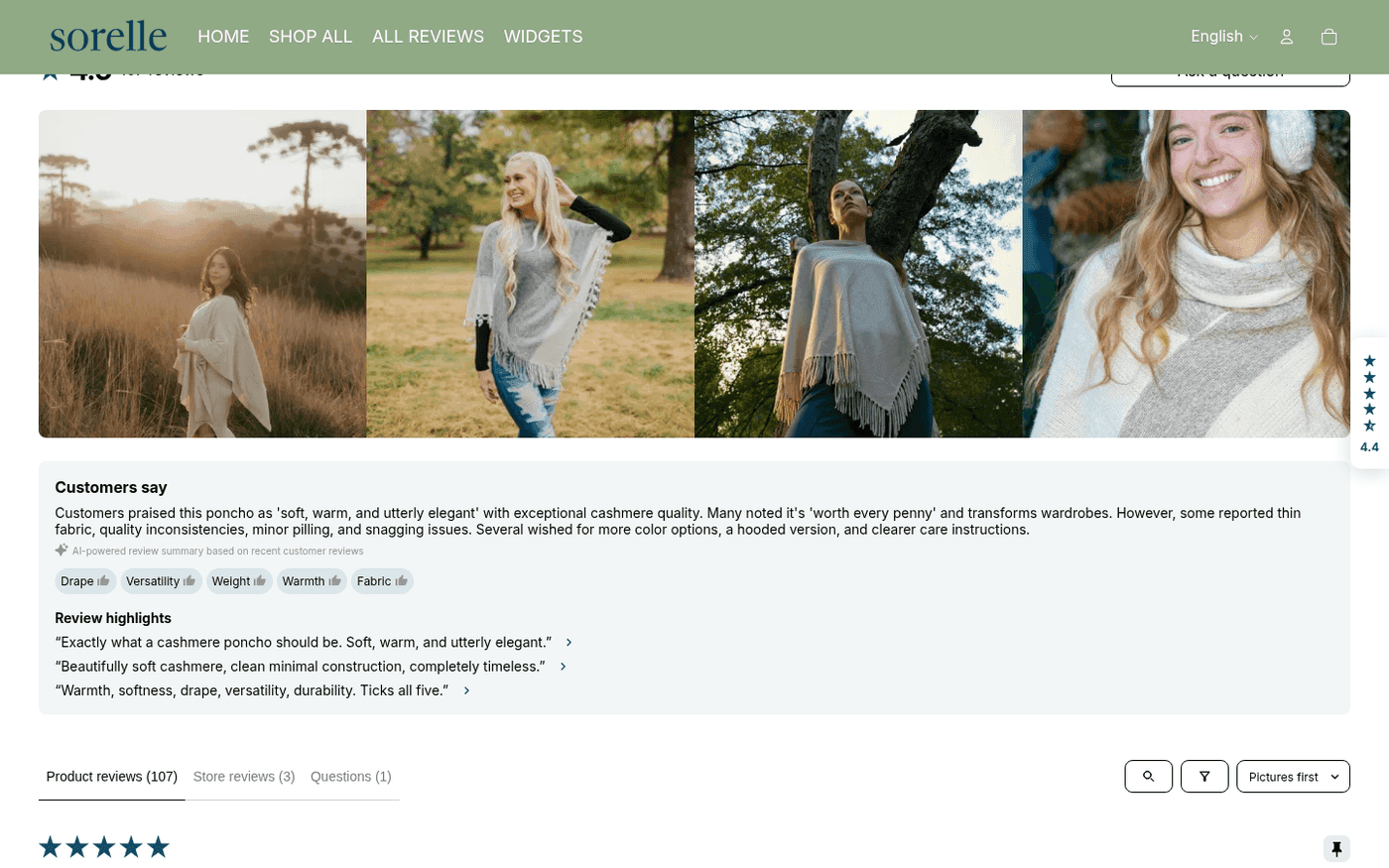
93%
of shoppers say reviews influence their purchase decision
3.5x
conversion lift on pages with photo reviews vs none
20
reviews is the credibility threshold I aim for before scaling ads
The good news: this is one of the few things in ecom you can fix in an afternoon. The setup below is exactly what I run on my own stores, from app choice to the placement details most people get wrong.
The step by step setup
- 1
Pick your review app
For most stores: Judge.me. It is $15 a month for everything you need, photo reviews, review requests, star snippets in Google. Loox is prettier if your product is visual (beauty, fashion, home). Shopify's free Product Reviews app was retired, so do not go looking for it. Under 50 orders a month? Judge.me's free plan is genuinely enough.
- 2
Install and place the widget
Install from the Shopify App Store, then in your theme editor (Online Store, then Customize) add the review widget as a section on the product page, directly under the product description. Then, and this matters, add the star rating snippet right under your product title. Stars near the price get seen; a widget buried at the bottom does not.
- 3
Turn on automatic review requests
This is where the reviews actually come from. Set the request email to send 14 days after delivery (not after purchase, after delivery). For consumables make it 7 days. One follow-up a week later if they did not respond. That single automation generates 80% of all reviews you will ever collect.
- 4
Reward photo reviews specifically
Offer a 10 to 15% discount code for a review with a photo, and only for photo reviews. Text reviews are fine but photo reviews are what strangers actually scroll through before buying. Judge.me and Loox both handle the coupon automation for you.
- 5
Import existing reviews if you have them
Moving from another platform or app? Export as CSV and import, both major apps support it. If you are dropshipping, do NOT bulk import AliExpress reviews with stolen photos. It is a legal risk and customers can smell it. Ten real reviews beat two hundred fake ones.
Do not hide your bad reviews
A 4.6 with a few honest 3-star reviews converts better than a suspicious wall of perfect 5s. Shoppers specifically read your worst reviews first to see if the flaw matters to them. Reply publicly to negative ones. A good reply to a bad review is the strongest trust signal on the page.
Getting your first 20 reviews from zero
The cold start is the hard part, because review requests need orders and orders need reviews. Here is how I break the loop: for the first two weeks I include a small handwritten-style card in every package with a QR code straight to the review form and a 15% code as a thank you. Then I personally email the first 30 customers three days after delivery, one line, asking how it went. Not a template blast, an actual question. About one in three replies, and half of those become reviews when I ask.
Twenty reviews took me 19 days on my last store using exactly this. After that the automation takes over and the flywheel runs itself. The trick is treating the first twenty like a project with a deadline instead of hoping they show up.
“Nobody wants to be your first customer. Reviews exist so nobody has to feel like they are.”

Written by
MaximusFounder of Majorka
Built Majorka after years of running his own stores and being tired of guessing. Every post here comes from real tests, real ad spend, and real mistakes he paid for so you do not have to.
Share article
Put this playbook to work in 30 seconds
Paste any AliExpress link and see the order curve, velocity, and verdict for yourself. Plans from $39/mo.
See it in MajorkaOrders · 24 wks
Scale23,491